False game vs. True game (pragmatism)

I’ve found some examples of people who have gotten Arduino/Unity serial communication to work…

…on Windows.

On mac, which is what I’m using (I don’t own a Windows PC), this seems possible, but requires more programs to run in the background, more serial communication, and more potential bugs to work out. Some methods require custom plug-ins for Unity, which means a Unity Pro license (upwards of $1500, so no, not happening). Someone else got a good interface going with Max/MSP. I used this program last semester in my Electronic Composition class, so I do have some prior experience I could bring. But, all of this is putting more complexity into a relatively small aspect of my project. Links to two of the most promising looking examples with actual code are below. Consider these the swan song of the Arduino/Unity aspirations of this project.

Squeezy Cube

Arduino 2 Unity (Windows)

However, Arduino/Processing serial communication works fine on a mac, and is something that is already fully supported by both programs through already written libraries that simply have to be enabled at the start of the programs. My project, quite simply, is not a game design project and was never intended to be such. This is part technical demo, part art installation, but although serial communication between the controller and the “game” is required, that “game” being built in Unity is not. Processing can manipulate and display lit 3D objects in space. It’s not nearly as sophisticated as an actual game development IDE can accomplish, but can work just fine for my project. My game was never going to be complicated anyway. A circle/sphere moving over sections of the screen that light up in sequence would be fine for this. Because the real meat of my installation will be “player” interaction with the controller, not the game, this Arduino/Processing option is desirable.

Here is a link to my previous Physical Computing blog (first time through), when I completed an exercise in serial communication where sensor data was sent from Arduino to Processing. The code here will be very helpful in tweaking the handshake program to work with my project. It will be nice, when I’m designing the technical aspects of the controller, and the aesthetics of the controller, that I will have a handshake protocol to work from. It will be a helpful time saver.

I intend for the controller itself to be a game in a way. Winning will mean getting the controller to function in the game. The game will be the sequence of events the player (sometimes players) must accomplish to allow the controller to send input into the “game”. Wrong inputs or correct inputs not in the correct sequence could cause a loss of progress. For example, mess up too much in step 6, get pushed back to step 3 or 4, depending on the severity. This is the game, and the meat of the project; design the controller and the win condition of the controller as a game. A game that really makes the player think or act quickly, more akin to those schoolyard games like “Red Rover” or “Red Light, Green Light”. And I want to be able to put enough design time into the controller so it really looks inspired. So it will grab the eye and draw the player in, even before anyone plays it. So, what should it look like, where should the controls be placed in the design. These are the big artistic questions. Not what the visual monitor game will look like.

This is why I’ve put “game” (the false game) in quotes when referring to the graphical aspect on the monitor. That is not the game, the controller is the game (the true game).

Rethinking Art, or Gameception

I had an insightful chat with our professor about my project implementation. He commented that while the idea of a game controller was sound, and while wearable computing was a potential direction to pursue, he worried that my project was headed too much towards the “mean.” According to him, my previous projects in his classes (I have had 3 previous ones with him) have always been easily recognizable as “me.” Apparently, I have a style, and I wasn’t really trying for one, specifically. 😀

So I brought up an idea I’d been batting around recently, after searching through Sparkfun’s online catalog. Sparkfun has many different sensors and actuators, but it also has a bunch of cool human interaction devices, switches, buttons, displays, that sort of thing. And not just the ones that might pop into your head at first. Sparkfun offers 6 inch tall number displays, of the type you probably see in your microwave. Fingerprint scanners; huge lighted palm sized buttons; switches with a flip cover, like you might see on some nuclear launch console. Sparkfun also offers many different types of joystick components, from old style Atari to current gen.

Some developers are so scared of game piracy (a real problem), that they have designed their games to work incorrectly, if at all, if certain conditions are not met. No internet connection, a code not entered correctly, etc. They have a right to do this to combat people stealing their games for reasons that are out of the scope of this post, but suffice to say these precautions can often become onerous for normal, legal players who just want to enjoy the game.

But what about the controllers for these games? As far as I have been able to tell, controllers themselves are not protected by similar measures. You can physically operate the controller, maybe move the cursor on the screen, without actually being able to play the game. But what if you couldn’t?

What if the controller was deliberately designed to challenge the user to ensure that anyone who can use it has both a great sense of patience and a sense of humor. A controller with, potentially, a fingerprint scanner that allows a switch to be read that allows a code to be displayed that must be entered, and so on. Different actions could branch off, depending on what the potential player performed. In attempting to eventually access the game, the controller could become the game. Winning the controller would then open up the game, but using the controller is an achievement in itself. I’m not out to torture the player, or induce so much frustration that he or she quits, but encourage further exploration and play every moment along the way. Like a good game should. I’ll explore this idea further, but as of now, this is my direction, after discussing my project idea with my professor.

Well, it IS possible…

Using Xbee to wirelessly connect an arduino project with a Unity game is possible. I have a video right here.

Eureka! Of a sort.

Now, how is it possible. Next up, look for Unity scripting tutorials (I assume a script is used to interface, and I know where the Unity scripting reference docs are). Also, familiarize myself with how exactly Xbee works. I was leaning toward Xbee over Bluetooth (both components are available through SparkFun) since I felt it might be more straightforward for my purposes. Now that I know this is indeed possible and not just my hopes and dreams, it is heartening. I’ll find it out.

Project proposal, graphical form.

This builds off of my previous posts on what I want my project to be, but in visual terms.

The Kinect, an interaction device.


kinect


Some robot arm, a wearable device.

robot arm


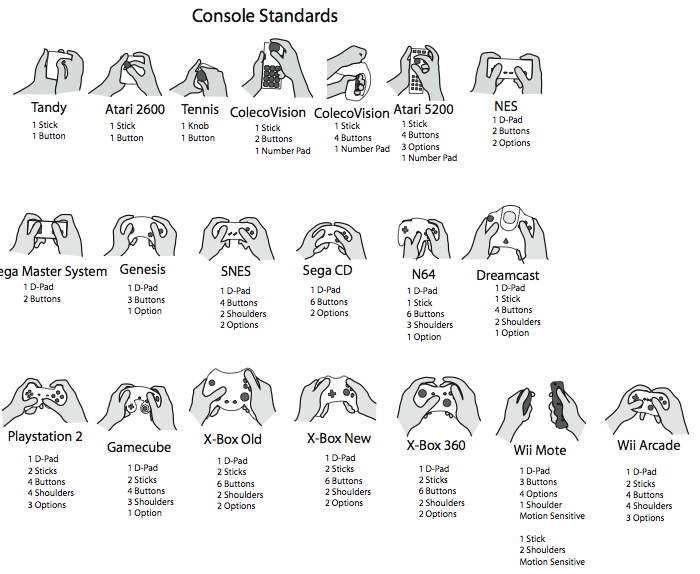
Vast majority of game controllers to date: they use the hands.

controllers


This Limb-troller will not only use the hand, it will be worn on the hand and arm. It will BE the hand and arm.

Addendum: dominant hand chosen

As an addendum, I’ve decided to pursue using my right arm and hand, instead of the left. I’m not disregarding my points from before, but after thinking more on the decision, I’ve decided using my dominant hand gives this potentially more varied usability. Hypothetically, what if I’m wielding something in my dominant hand. Going off of the example from earlier, a sword fighting game would play better from the dominant hand. I’ve been doing a little informal testing of each hand for dexterity, and it seems my dominant hand is slightly better in that respect. So maybe the reason that the non-dominant hand traditionally controls everything but the aim and firing in a game is not because it’s supposed to be more dexterous with multiple options, but simply because nothing better is available. Well, that’s what I aim to fix, or at least address, with this Limb-troller, dominant hand side.