I’ve found some examples of people who have gotten Arduino/Unity serial communication to work…
…on Windows.
On mac, which is what I’m using (I don’t own a Windows PC), this seems possible, but requires more programs to run in the background, more serial communication, and more potential bugs to work out. Some methods require custom plug-ins for Unity, which means a Unity Pro license (upwards of $1500, so no, not happening). Someone else got a good interface going with Max/MSP. I used this program last semester in my Electronic Composition class, so I do have some prior experience I could bring. But, all of this is putting more complexity into a relatively small aspect of my project. Links to two of the most promising looking examples with actual code are below. Consider these the swan song of the Arduino/Unity aspirations of this project.
However, Arduino/Processing serial communication works fine on a mac, and is something that is already fully supported by both programs through already written libraries that simply have to be enabled at the start of the programs. My project, quite simply, is not a game design project and was never intended to be such. This is part technical demo, part art installation, but although serial communication between the controller and the “game” is required, that “game” being built in Unity is not. Processing can manipulate and display lit 3D objects in space. It’s not nearly as sophisticated as an actual game development IDE can accomplish, but can work just fine for my project. My game was never going to be complicated anyway. A circle/sphere moving over sections of the screen that light up in sequence would be fine for this. Because the real meat of my installation will be “player” interaction with the controller, not the game, this Arduino/Processing option is desirable.
Here is a link to my previous Physical Computing blog (first time through), when I completed an exercise in serial communication where sensor data was sent from Arduino to Processing. The code here will be very helpful in tweaking the handshake program to work with my project. It will be nice, when I’m designing the technical aspects of the controller, and the aesthetics of the controller, that I will have a handshake protocol to work from. It will be a helpful time saver.
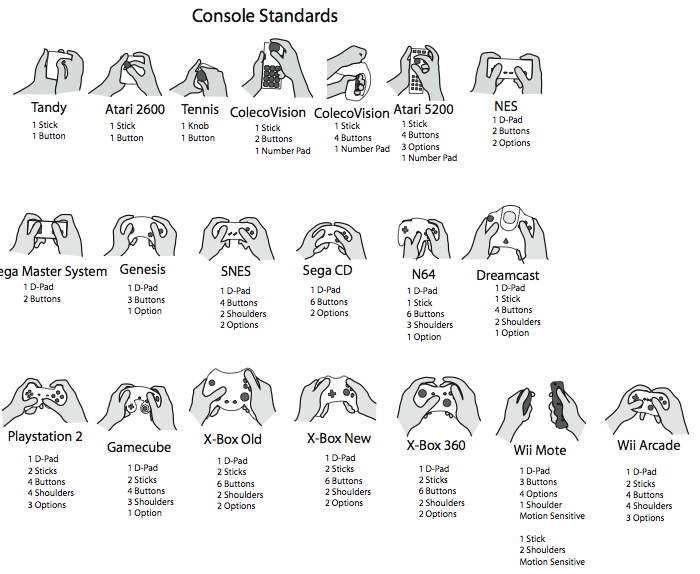
I intend for the controller itself to be a game in a way. Winning will mean getting the controller to function in the game. The game will be the sequence of events the player (sometimes players) must accomplish to allow the controller to send input into the “game”. Wrong inputs or correct inputs not in the correct sequence could cause a loss of progress. For example, mess up too much in step 6, get pushed back to step 3 or 4, depending on the severity. This is the game, and the meat of the project; design the controller and the win condition of the controller as a game. A game that really makes the player think or act quickly, more akin to those schoolyard games like “Red Rover” or “Red Light, Green Light”. And I want to be able to put enough design time into the controller so it really looks inspired. So it will grab the eye and draw the player in, even before anyone plays it. So, what should it look like, where should the controls be placed in the design. These are the big artistic questions. Not what the visual monitor game will look like.
This is why I’ve put “game” (the false game) in quotes when referring to the graphical aspect on the monitor. That is not the game, the controller is the game (the true game).


 Physical Computing, Round 2